
Metar-Taf - Visual decoder
Studio EvelineWeather
4.850.00 Reviews
- Version
- 2.8.0
- Installs
- 10.00K
- Age Rating
- Everyone
Screenshots
Our Review of Metar-Taf - Visual decoder
 Analysis by Appyee
Before I would trust an aviation weather report to guide a decision, I’d want to know what each compact code actually says and which details matter for the situation in front of me. METAR and TAF strings can be hard to scan if you don’t read them often, so a visual decoder has a clear job: make the report easier to interpret without making the underlying weather seem simpler than it is. That is the problem Metar-Taf - Visual decoder is built around, and it’s the reason I’d consider it when I need to turn a coded report into a more readable picture.
Start with the report you need to understand
This is a weather app aimed at aviation reports rather than the broad “will it rain today?” question most general forecasts answer. That distinction matters. If I’m checking conditions around an airport, a METAR gives me an observation to interpret, while a TAF is a forecast expressed in aviation shorthand. The app’s focus is useful when those are the exact materials I have, but it is not a substitute for a general-purpose forecast when I simply want an everyday outlook for my neighborhood.
The practical starting point is the code itself. I can enter a METAR or TAF and use the decoded presentation to work through details such as wind, visibility, and cloud cover without having to mentally translate every abbreviation first. That makes the app useful for a student revising report structure, a curious traveler trying to understand a briefing, or a pilot reviewing aviation weather information. I’d still treat the report as something to read carefully, not as a single pass/fail signal.
Studio Eveline has kept the app’s purpose narrow. It is listed as an Everyone-rated app, and its current version is 2.8.0. The price is $5.99, so I would think of it as a paid specialist tool rather than a casual free weather download. Its 4.9 average from around a thousand ratings and over ten thousand installs suggest that it has found an audience, though those figures alone cannot tell me whether it suits a particular user’s routine.
Breaking Down Metar-Taf - Visual decoder
Metar-Taf - Visual decoder is like having a personal translator for aviation weather reports right in your pocket. The app is designed to make sense of METAR and TAF reports, which are essential for pilots but can be pretty daunting for the rest of us. With a clean interface and straightforward functionality, it aims to simplify the complex data into something we can all understand.
First Impressions
When you first open the app, you’re greeted with a simple and intuitive layout. It’s not cluttered with unnecessary features, which is a huge plus in my book. The design is sleek, focusing on providing the information you need without any fuss. You can tell a lot of thought has gone into making it user-friendly.
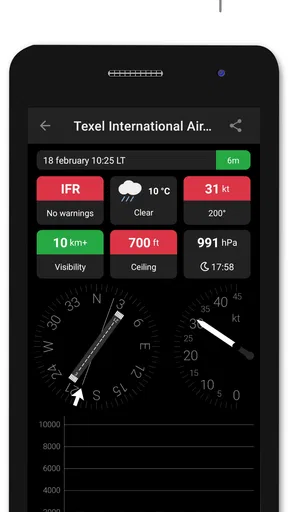
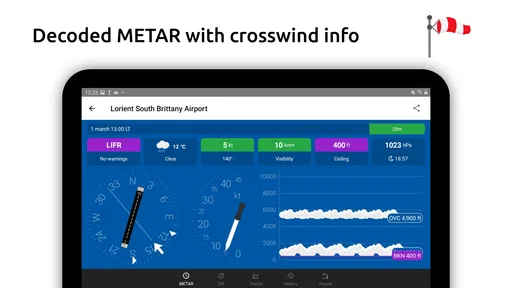
Entering a METAR or TAF code is super easy. Just type it in, and voilà, the app does its magic. I was impressed by how swiftly it decodes the data into plain language. Suddenly, all those cryptic wind speeds, visibility, and cloud cover terms become a breeze to understand.
Read the picture, then return to the details
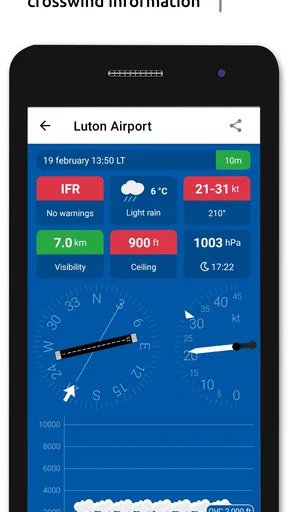
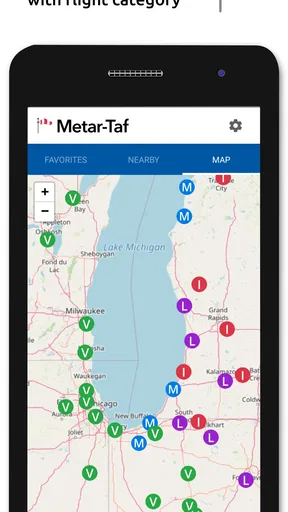
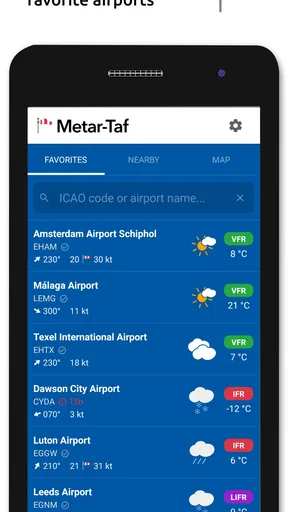
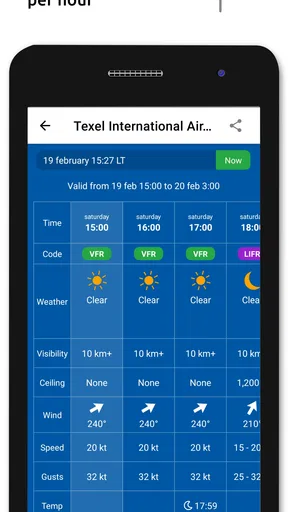
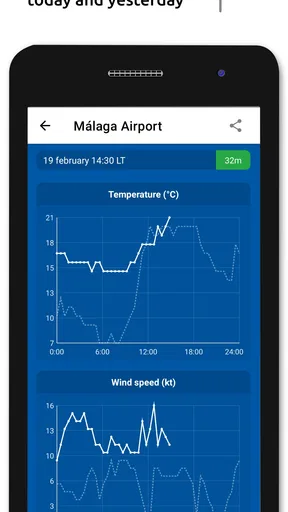
One of the standout features for me was the visual representation of weather conditions. The app doesn’t just decode; it illustrates. You get to see symbolic weather maps and graphs that provide a visual summary of the data. It’s like having a weather channel, but specifically for aviation reports.
That visual layer is most helpful as a second pass, not a replacement for reading the decoded wording. I would first identify the report and its time context, then use the graphics to get a quick sense of the conditions, and finally revisit the text for anything that could change how I interpret the picture. A chart can make a pattern easier to spot, but it can also encourage a too-fast conclusion if I stop at the icons. For a report that affects a real flight decision, I’d use the visual overview to orient myself and keep the coded and decoded report in view as well.
Moreover, the app offers customization options, allowing you to set up notifications for specific locations or conditions. This is super handy if you’re a frequent traveler or a weather enthusiast. You can keep tabs on any changes without constantly checking the app.
A useful routine from check to decision
Imagine I’m preparing for a trip and want to understand the weather at an airport. I would begin with the relevant report, enter the text, and use the decoding to make the shorthand more approachable. Then I’d compare the visual summary with the words rather than relying on either alone. If I expect to monitor a location over time, notifications can reduce the need to reopen the app repeatedly; if I’m only checking once, setting them up may add unnecessary work.
This kind of workflow also helps when I’m learning. Instead of trying to memorize every code before looking at a report, I can use the decoded view to connect a term with its meaning and then return to the original string to see how the information is arranged. That back-and-forth is more useful than treating the app as a black box that turns a code into an answer. For a student, the goal should be to become more comfortable reading reports, not to become dependent on a translation screen.
Notifications and historical data can serve different purposes. Alerts are for keeping an eye on changes without repeatedly checking, while looking back at earlier conditions can help me compare how a weather situation developed. I’d use that history for study or context, not as a guarantee that a future day will behave the same way. Past reports can make patterns easier to discuss, but they don’t replace a current forecast or a fresh observation.
Where this specialist tool fits
Compared with ordinary weather apps, this one is more focused on aviation reports and less suited to browsing a broad local forecast. A standard weather app may be the better choice if I want an at-a-glance rain chance, a day planner, or familiar hourly conditions without aviation terminology. On the other hand, those general displays usually aren’t designed to help me make sense of METAR and TAF strings. I’d keep this app for the aviation-report task and use a general forecast for everyday plans rather than expecting one tool to do both jobs equally well.
I’d especially recommend it to people who encounter aviation reports often enough to benefit from a clear decoder: pilots and trainees can use the readable presentation as a convenient aid, while weather enthusiasts can explore the format without immediately getting stuck on abbreviations. It is less compelling for someone who rarely sees a METAR or TAF, since the narrow purpose and paid price may not justify a download for occasional curiosity. If you already read these reports fluently, the visual explanation may be less valuable than simply consulting your usual source.
There is also a handoff to keep in mind. The app can help translate and present a report, but the user still has to decide what the information means in context. I would not treat an alert, a graphic, or a simplified phrase as an operational clearance. Aviation weather decisions can depend on details and timing, so I’d use the app as an aid to understanding and check the appropriate authoritative material and procedures before acting. That boundary is not a flaw in a decoder; it is the sensible limit of what a decoder should be asked to do.
Getting the Most Out of the App
While the app is straightforward, there’s a lot you can do to enhance your experience. For instance, utilizing the notification settings can save you a lot of time. You can set alerts for significant weather changes, which means you’ll be informed even if you’re not actively checking the app.
For a cleaner routine, I’d choose notifications only for places or conditions I genuinely need to follow. Too many alerts can create noise and make it harder to notice the change that matters. If I’m studying one report, I’d leave alerts aside and focus on the code, the plain-language interpretation, and the visual summary. If I’m tracking a location, I’d set up the relevant notifications and still open the report when I need to inspect its specifics.
Another tip is to use the app’s historical data feature. It allows you to look back at previous weather patterns, which can be invaluable for planning future trips or just satisfying your curiosity about how weather conditions have evolved over time.
I’d be cautious about using historical reports as a planning shortcut. They are better for understanding what happened and practicing interpretation than for predicting a particular future flight day. A useful exercise is to compare an earlier report with a current one and notice which parts changed, then ask what the change means in context. That makes history a learning aid instead of a reason to assume conditions will repeat.
Limits worth keeping in view
The main trade-off is specialization. This app is built around METAR and TAF, so a newcomer who wants a complete lesson in aviation weather may still need other learning material, and someone seeking a broad daily forecast may feel they have opened the wrong tool. The visual presentation can make reports friendlier, but it cannot remove the need to understand the terms or judge their relevance. I’d also avoid assuming that a simplified explanation settles every ambiguity; when the exact wording matters, I would return to the source report and verify what I’m reading.
There is a practical question about the purchase: will I use this often enough to make a paid specialist app worthwhile? At $5.99, my answer depends on whether aviation reports are part of my regular study, work, or travel preparation. Someone who checks them repeatedly may value the quicker decoding and visual overview; a casual user who wants tomorrow’s local forecast is likely better served by a general weather app. The 7.0 minimum OS requirement is another straightforward check before installing, particularly on an older device.
The Final Verdict
I’ve got to say, Metar-Taf - Visual decoder is a game-changer for anyone needing to decipher aviation weather reports. Whether you’re a pilot, a meteorology student, or just someone curious about the weather, this app makes the information accessible and understandable. The mix of text and visuals offers a comprehensive overview that’s hard to beat.
In conclusion, if you’re looking for a reliable, efficient, and user-friendly tool to decode METAR and TAF reports, this app should definitely be on your radar. It’s not just about translating weather data—it’s about transforming it into something that’s easy to digest and use. So go ahead, give it a try, and see how it can simplify your weather-watching experience!
Verdict
Strengths of Metar-Taf - Visual decoder
- Easy-to-understand interface for quick access.
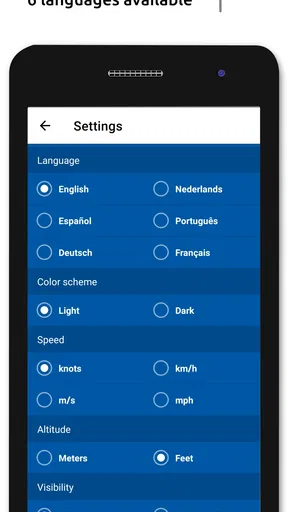
- Supports multiple languages for global users.
- Real-time updates ensure accuracy.
- Customizable alerts for specific weather conditions.
- Offline access to previously downloaded data.
Limitations of Metar-Taf - Visual decoder
- Limited advanced features for professional use.
- Occasional loading delays in high traffic.
- Ads can be distracting for free users.
- Requires frequent updates for best performance.
- Lacks detailed weather maps for visual analysis.
Similar Picks in This Category
View All
Weather - By Xiaomi
Xiaomi Inc.4.1

Weather & Radar Forecast
WetterOnline4.8

Weather
OneLouder Apps4.6

AccuWeather: Weather Radar
AccuWeather3.6

The Weather Channel - Radar
The Weather Channel4.6

1Weather Forecasts & Radar
OneLouder Apps4.3
Frequently Asked Questions
What is Metar-Taf - Visual Decoder and how does it work?
Metar-Taf - Visual Decoder is a specialized app designed for aviators and weather enthusiasts to decode METAR and TAF reports. It transforms complex aviation weather data into an easy-to-understand visual format, providing users with real-time insights into weather conditions at various airports worldwide. The app's intuitive interface simplifies the decoding process, making it accessible even for those new to aviation weather reports.
Is Metar-Taf - Visual Decoder available for both Android and iOS devices?
Yes, Metar-Taf - Visual Decoder is available for both Android and iOS platforms. Users can download it from the Google Play Store and Apple App Store, ensuring a wide reach for aviators and weather enthusiasts regardless of their preferred mobile operating system. The app is optimized for seamless performance across different devices and screen sizes.
Are there any subscription fees or in-app purchases in Metar-Taf - Visual Decoder?
Metar-Taf - Visual Decoder offers a free version with basic features, but it also includes optional in-app purchases. These purchases unlock premium features such as enhanced data visualization options and additional weather data sources. Users can choose to subscribe for a more comprehensive experience, depending on their specific needs and preferences.
How accurate is the weather data provided by Metar-Taf - Visual Decoder?
The app sources its data from official aviation weather services, ensuring high accuracy and reliability. It regularly updates to reflect real-time conditions, which is crucial for aviators who depend on precise weather information for flight planning. Users can trust the data provided by the app due to its adherence to international aviation weather standards.
Can Metar-Taf - Visual Decoder be used offline?
Metar-Taf - Visual Decoder primarily requires an internet connection to fetch the latest weather data. However, it offers an offline mode where previously downloaded METAR and TAF reports can be accessed. This feature is particularly useful in areas with limited connectivity, allowing users to review data without an active internet connection.
